| Support Category: Course Completion Issue |
| Specialist Notes: |
The CSOD Foundation Administrators have granted End-User Support permissions to mark a course as ‘Complete’ for users with course completion issues. There are required steps to do before marking a course as complete:
1. We are required to troubleshoot the issue.
2. Check the course details, specifically the ‘Training Progress’ information in the courses’ training details. Check if the user spent sufficient time in the course. (View Time should be equivalent to or more than the Training Hours)
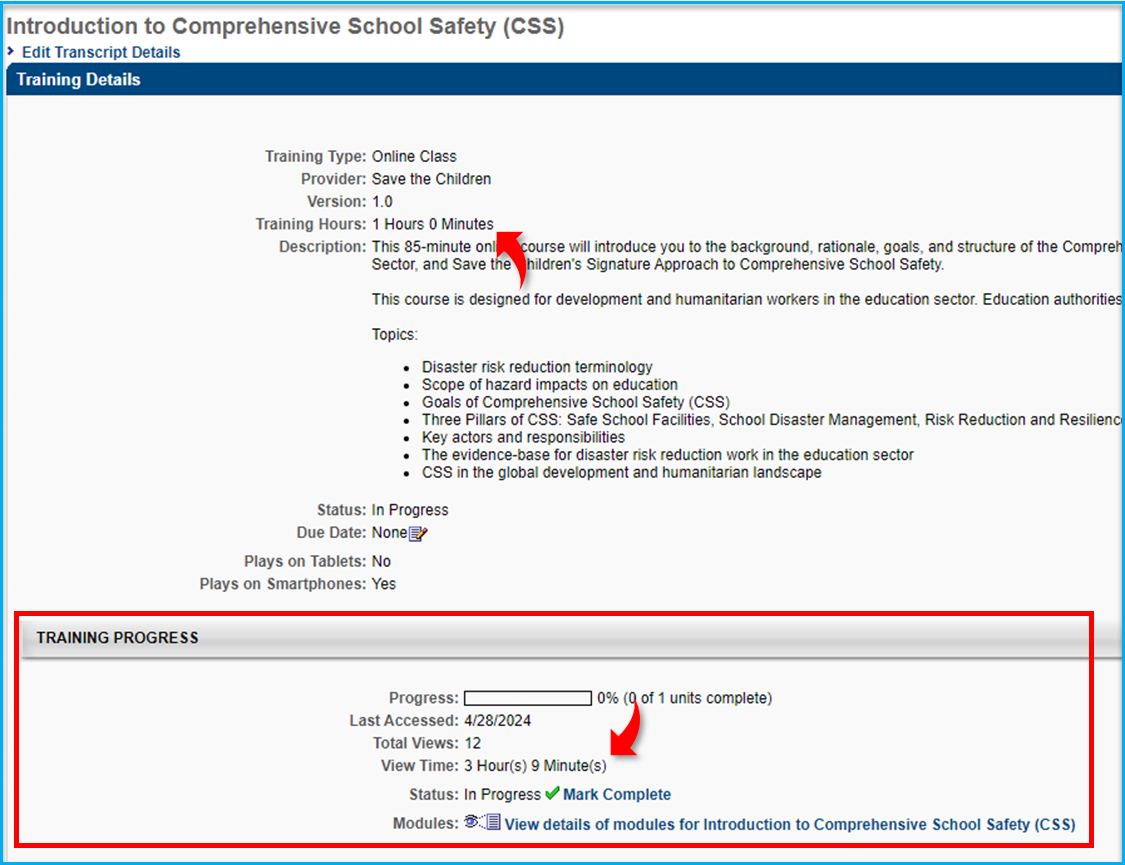
3. Gather proof of completion. It can be provided by the user or retrieved via proxy.
Kindly refer to How to Mark a Course as Complete which contains detailed instructions on how to mark a course complete in CSOD.
If the user does not wish to troubleshoot or is unable to provide proof of completion, you can still mark the course as complete. Be sure to note it in the ‘Comments’ section (see Step 11 in the How to Mark a Course as Complete guide).
Note: Courses can be marked as complete at the chat and ticket level. No need to create a ticket to have the course marked as complete.
| Standard Response: |
